Why WatchTower

WatchTower

Continuous network security auditing, live monitoring, and configuration management — one platform an MSP or ISP runs their whole fleet from, and hands each customer their own window into.

28+ automated security checks
30-second config change detection
Self-hosted — your infrastructure, your data
Resellable — package it as your own managed service
the pitch

Two disciplines, one system

WatchTower is two products that happen to share a login. Neither one is a bolt-on to the other — and both scale across as many customer networks as you manage.

Security Auditing

Find the risk

Analyzes every managed network's configs for security misconfigurations, scores them the same way every time, and delivers alerts and customer-ready reports automatically — on a schedule, not as a one-off engagement.

  • 28+ checks, four severity levels, rolled into one comparable score
  • Score trend reporting — every audit plots against every prior one
  • Customer-ready HTML/PDF reports, generated automatically
Network Management

Manage the fleet

A working NCCM system: inventories devices, version-controls every config change, pushes updates through verified automation, gives you a live SSH terminal, tracks CVEs, and monitors uptime — all on the same inventory.

  • Live ping + BGP monitoring, alerting the moment something actually goes down
  • Automated config backups with full version history, not just a change log
  • Verified automation — scripted pushes proven with a real before/after diff
— both scoped to the same multi-tenant access model —
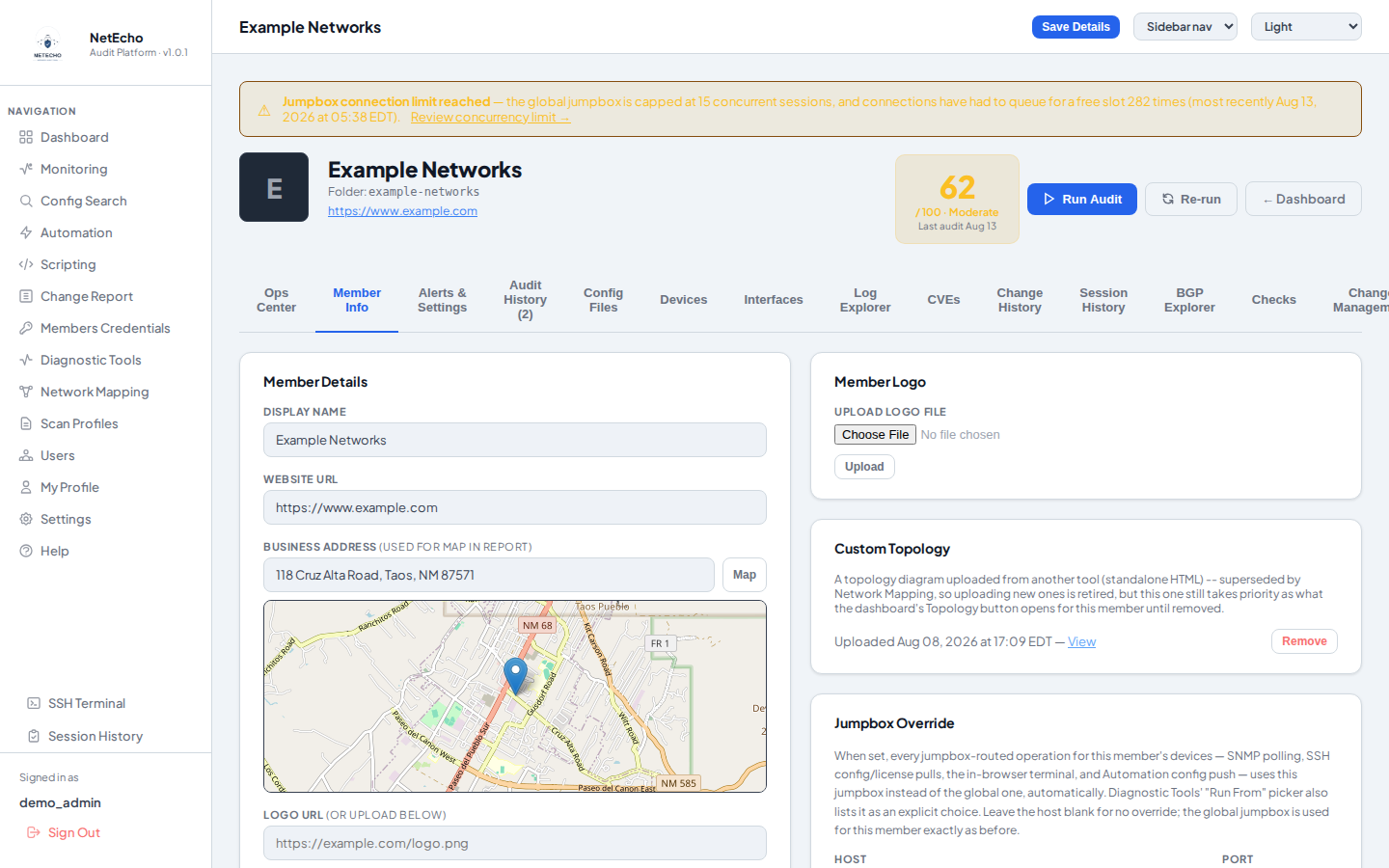
WatchTower member page for a demo network (“Example Networks”) showing the audit score and full tab set
Demo data — one member's page: audit score, tabs for every discipline above, in one place.
the alternative

What checking by hand actually costs

The realistic alternative to running this isn't a faster manual audit — it's not auditing at all, or auditing once and calling it done. Here's what one real pass over a fleet actually runs, by size.

Fleet sizeOne manual passTo stay current (quarterly)
200 devices100 hrs  ·  $8,500$34,000 /yr
400 devices200 hrs  ·  $17,000$68,000 /yr
600+ devices300+ hrs  ·  $25,500+$102,000 /yr
Illustrative estimate, shown with its assumptions rather than as a guaranteed figure: ~30 minutes/device for a security review at this depth (28 checks across four severity levels — default/weak credentials, unencrypted management protocols, missing AAA, redundancy gaps, and more), at an $85/hr fully-loaded engineer rate, repeated quarterly to stay reasonably current. A slower cadence costs less but leaves the fleet stale longer; a faster one costs more.
Manual audit
6+ months
  • One pass, done by hand — a senior engineer working every device against every check, for a network of any real size
  • Needs dedicated headcount or an outside consulting engagement — either way, cost and lead time, on top of the hours above
  • A snapshot, not a status — accurate the day it finishes, already stale the day after
  • The exposure doesn't wait for anyone to get to that part of the network
WatchTower
Continuous
  • Minutes per device, run on a schedule — not a project with a start and an end, and not billed by the hour
  • No added headcount — the same platform your team already uses to manage the fleet runs the audit too, at any of the fleet sizes above
  • Re-scored on every change — drift is caught the same day it happens, not at the next quarterly pass
  • Real trend reporting — every audit plots against every prior one, so network health is a line management can see, not a single point-in-time score
  • Dated, standing evidence that due diligence actually happened
Why it matters

A misconfiguration doesn't wait for the next scheduled audit to become an outage or a breach. And "we hadn't audited that part of the network yet" is not a defensible answer — to a regulator, an insurer, or a customer. The hours above buy one dated snapshot; WatchTower keeps the fleet current for a fraction of the recurring labor cost, freeing that engineer time for revenue work instead of checklist work.

the exposure

An unfound vulnerability is still your liability

Not knowing about a gap doesn't reduce exposure to it — it only decides who finds it first: you, or whoever's already looking for it.

  • Exposure builds up two ways, both invisible without a check — day-to-day configuration drift, and newly-disclosed CVEs against hardware already sitting in the fleet
  • The National Vulnerability Database doesn't wait for a review cycle — new CVEs publish continuously, whether anyone's looking that week or not
  • "We didn't know" is a shrinking defense — regulators and cyber-insurance underwriters increasingly treat a check that could have run as a check that should have
  • A stale scan is a liability with a date stamp on it — proof someone looked once, not proof the network is safe today
  • The incident this prevents costs far more than the audit does — a single breach or an insurer's post-incident finding of "known, unpatched exposure" routinely outweighs years of the audit hours priced above
How WatchTower keeps you ahead

Every device is re-scored the day a change lands, and the full fleet can be swept on demand or on a schedule against the National Vulnerability Database's live CVE feed — matched to each device's exact platform and firmware via CPE version matching, not a generic "IOS has a CVE" alert. New exposure surfaces within a day, not months later at the next manual review.

audit

Every angle of risk, checked automatically

Not just config review — actual exposure, actual redundancy, actual IP usage, and actual recoverability, verified against real external data.

  • 28 checks and growing, weighted across four severity levels and rolled up into one comparable network score — any check can be disabled per customer, with the score recalculating instantly. Critical-tier findings include default/generic admin accounts, no enable secret, and Telnet or SNMP public/private strings still active; lower tiers catch things like unencrypted (type-7) passwords, no AAA, no NTP, and missing BPDU guard
  • Build your own checks — Scan Profiles let you add line-item custom checks (contains/does-not-contain word conditions with AND/OR) with no regex required, so the check library grows to match your own standards, not just the built-in set
  • Backup Configuration Manager — every device's running-config is pulled and version-controlled on a schedule, so there's always a recent, restorable copy on hand, independent of the change-tracking/diff workflow
  • BGP Explorer confirms owned IP space is actually reachable from the internet and has redundant upstream paths — verified live against two independent public route collectors, RIPE RIS and RouteViews, not just what the config claims
  • Intrusion testing from the outside in — every public interface IP is port-scanned and open management ports are live-probed, so a config that looks locked down but isn't actually exposed gets caught either way
  • IPAM, generated automatically from the same BGP ownership data — utilization alerts before a block runs out, no spreadsheet to maintain
Why it matters

A route can be misconfigured and never advertised, or correctly configured but silently not carried. A port can look closed on paper and still be reachable. WatchTower verifies the actual state, not just the intent in the config — and keeps a recoverable copy of that config on hand either way.

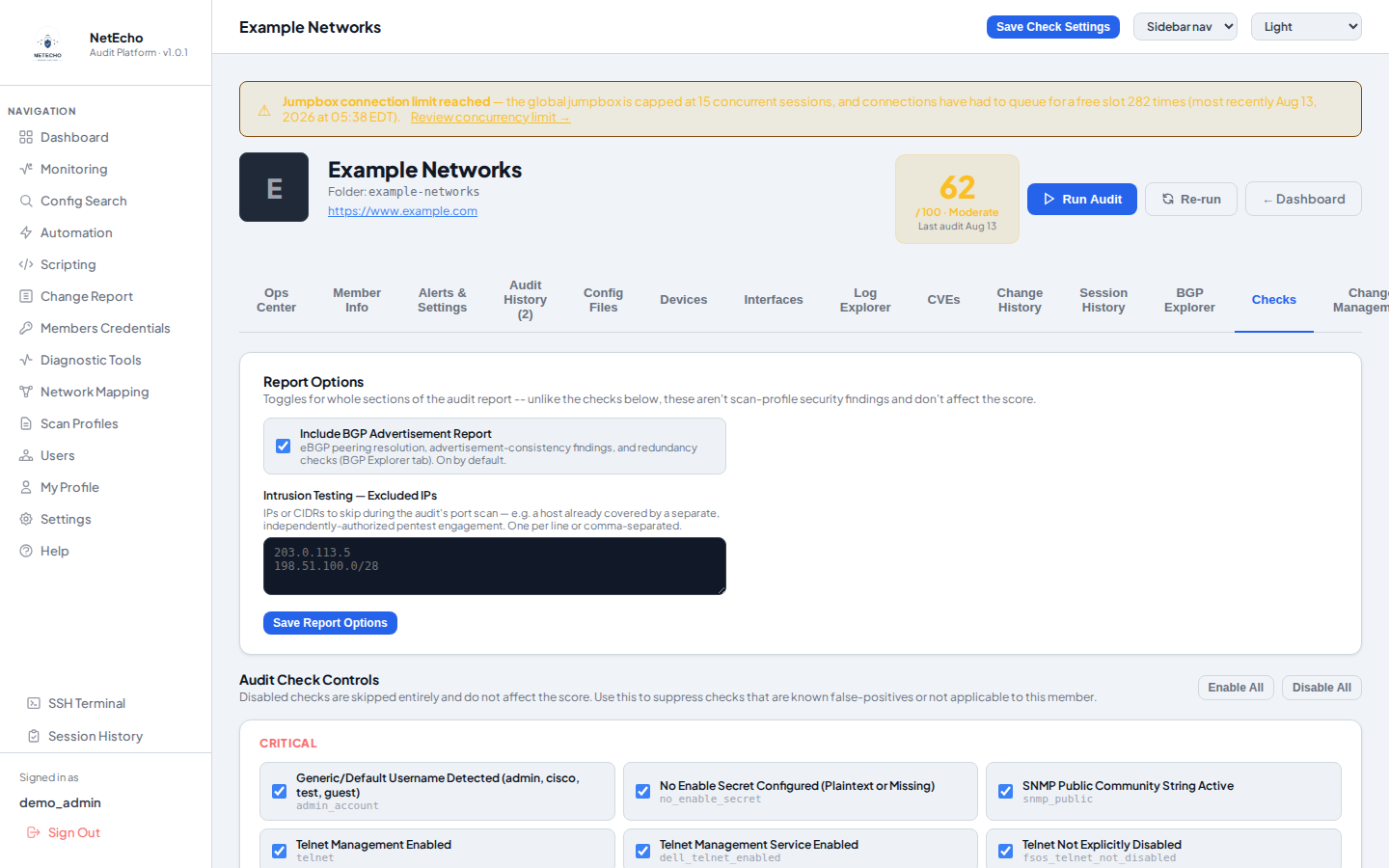
The audit check library for a demo member, grouped by severity, each individually toggleable
Demo data — the check library, per member. Any check can be disabled without touching the others.
change management

Every change, tracked — and every rule, enforced

A background watcher fingerprints every config every 30 seconds. Nothing changes without a record, and sensitive networks get their own rules enforced automatically.

  • Full diff history per device, with cosmetic noise (timestamps, masked passwords) filtered out so only real changes ever get flagged
  • Scheduled digest emails summarize every unapproved change, org-wide or per customer, with the actual diff included
  • Per-member change rules — View Only, Contact Before Any Change, Requires a MOP — flagged red on the dashboard and enforced, not just advisory: opening a terminal on a View Only network stops on a blocking confirmation first
  • Grep-style Config Search across every device, scoped to what each user is allowed to see
Why it matters

A missed or unauthorized change is one of the most common causes of a network incident. This turns "did anything change?" from a question someone has to remember to ask into something the system already answered.

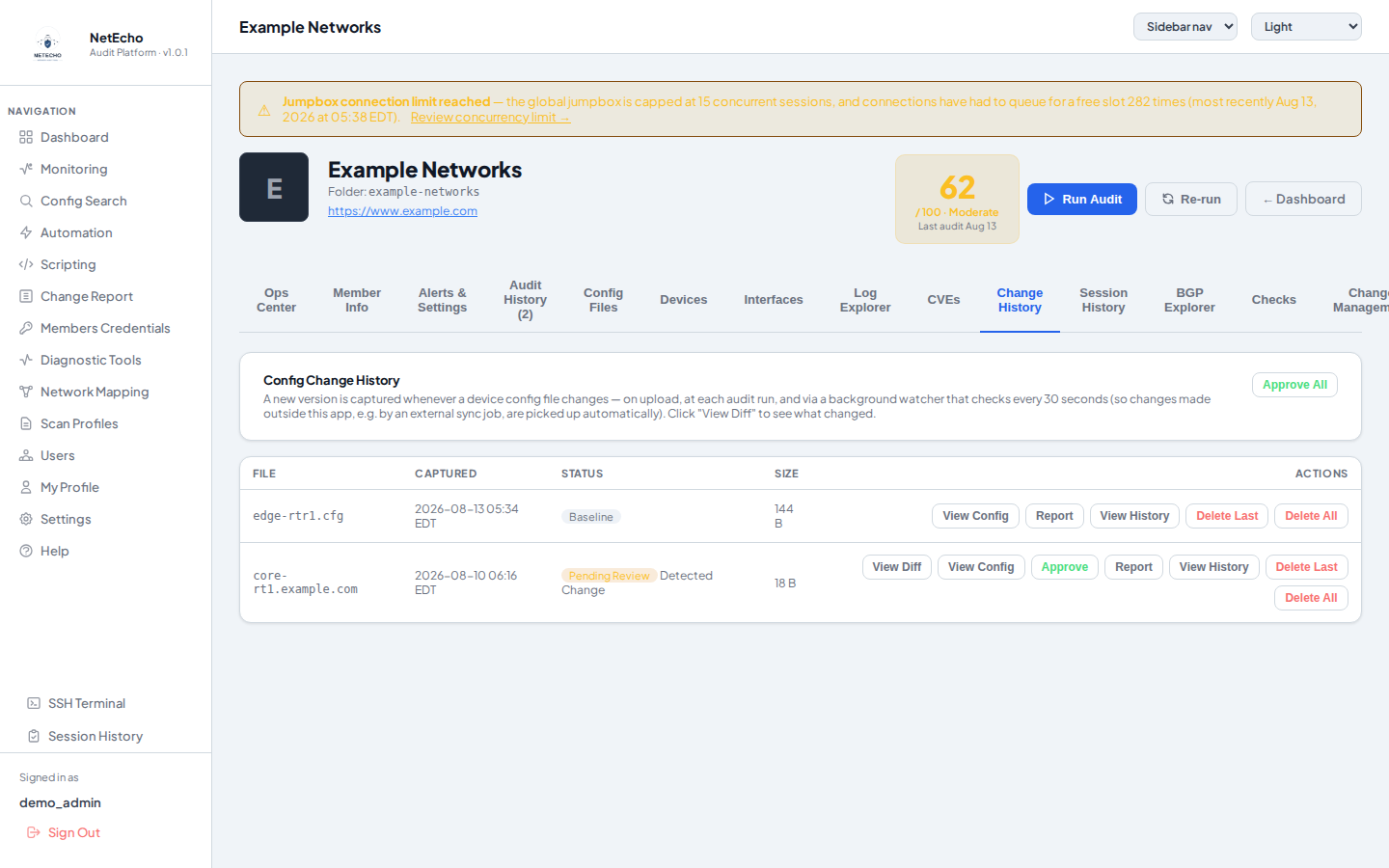
Config Change History for a demo device, showing a pending-review config version awaiting approval
Demo data — a captured config change awaiting review, with View Diff/Approve/Report actions.
monitoring

Know what's down before your customer tells you

Ping-based device status and live BGP peer state, side by side, refreshing automatically — with alerting that actually reaches someone.

  • Time-based alarm thresholds — a device has to stay down for real, not just drop one packet, before it's declared down and alerted
  • BGP down alerts include circuit diagnostics — pings both ends of the link and calls out "contact upstream carrier" when only the remote side fails
  • PagerDuty, always additive — your own global integration plus each customer's own, both firing independently, never one instead of the other
  • Alarms with Acknowledge and Snooze — clear a real incident, or snooze a flapping device through a maintenance window without losing visibility afterward
Why it matters

Knowing a feature is "turned on" isn't the same as knowing what's actually down right now. This is the one place that answers it — for every customer, automatically.

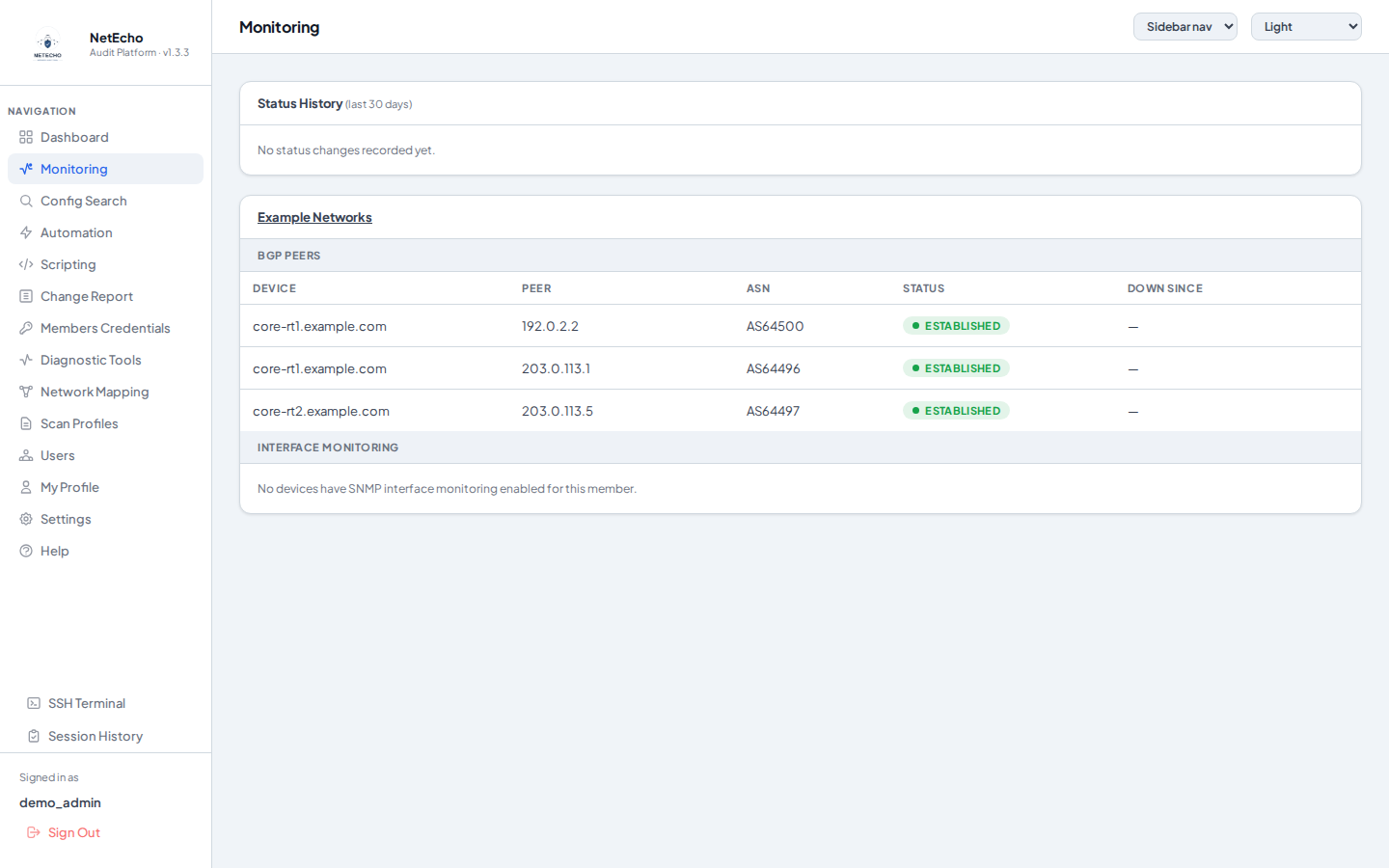
Monitoring page Status History and per-device ping status for a demo network, showing a live up/down mix
Demo data — Status History plus live device state for one customer network.
automation

How changes actually get pushed — and who's allowed to push them

A simple scripted language drives the session exactly as written, and a push is only ever marked "passed" once it's been proven with a real before/after diff.

  • How it works — a line-based script drives an interactive SSH (or Telnet) session exactly as written: WAIT <text> blocks until that text appears anywhere in the output, WAIT <seconds> is a fixed timed delay, SEND <text> types it and presses Enter — no fragile automatic prompt-guessing, and the full session output (not just which steps ran) is captured live and in the saved transcript
  • Roles — a named allowlist of scripts — an admin defines a Role as a specific set of scripts, then assigns it to a restricted user; that user can only ever run what's on the list, layered on top of (never replacing) their normal member/permission scoping — a role can narrow access, never grant more than the user already had
  • Dry-run preview shows exactly which devices are eligible and the resolved, secret-masked command sequence before anything is sent for real — running for real always requires an explicit confirmation
  • Before/after diff verification pulls the running-config immediately before and after the script runs, so a "passed" result always comes with proof the change actually landed, not just that the script finished without erroring
  • Flexible, parallel targeting — one device, an arbitrary subset, a whole customer, or every device globally, with an optional 1–10 parallelism slider for large batches, and a live abort button that stops before the next device mid-run
  • Runs can't run away — every script is capped at 200 steps and a 10-minute hard ceiling per device, so a bad script or a device stuck waiting on unexpected output fails fast instead of hanging a batch push
  • Recurring or one-time schedules, with a completion-summary email so a bad unattended run doesn't go unnoticed
Why Roles matter

Delegating automation access used to mean all-or-nothing per customer. Roles let you hand a junior tech, or a customer's own team, exactly the scripts they need — nothing else — without opening up the rest of the automation library or another customer's devices.

for msps & isps

Your fleet's control tower — and every customer's own window into it

One platform to run your whole managed-services book from, that also gives each customer scoped, self-service visibility into their own network — and one you own the deployment of, not rent by the seat from someone else.

Every customer, one login

Manage every network you're responsible for from a single admin view — unlimited customer networks under one platform, one dashboard, one place to look.

A window for every customer

Each customer gets their own scoped login — their score, their change history, their monitoring, their own team — without ever seeing another customer's data.

Yours to host and resell

Self-hosted, inside your own infrastructure, with your own company name and logo on every report — sell it as part of your own managed-services package, not a third party's SaaS line item on your customer's invoice.

Scales without linear headcount

The same audit/monitoring/automation engine covers 10 devices or 10,000 — onboarding customer #40 is adding a member folder, not hiring another engineer to keep the checklist pace of #1 through #39.

A billable line item, not a favor

Continuous security auditing and dated, standing evidence of due diligence is a real deliverable — package it as its own managed-security tier instead of quietly absorbing the labor as unbilled overhead.

Same-day customer onboarding

Point it at a new customer's fleet and get a scored baseline, a device inventory, and config backups the same day — not a multi-week assessment engagement before the relationship even starts billing.

Real tenant self-service

Customers manage their own team and add their own devices — every action still attributable and logged, same standard as admin's.

Credentials encrypted, no phone-home

Device credentials and 2FA secrets encrypted at rest, key stored outside the database. The platform never contacts anything outside your network on its own.

Break-glass recovery

One permanent recovery account no other admin can delete, demote, or lock out — closing the one path a compromised admin could use to lock everyone else out.

The economics, across the book

Every customer network on your book carries its own version of the manual-audit math a few sections back — multiply it out across even a modest customer list and the recurring labor cost of doing this by hand, per customer, adds up fast. WatchTower runs it continuously for the whole book on one platform, and replaces what would otherwise be several separate tools — a vulnerability scanner, an NCCM/config-backup system, an uptime monitor, an IPAM spreadsheet — with their license and integration overhead each priced and renewed on its own.

Why local hosting matters here

Your customers' device credentials and configs never leave infrastructure you control — no third-party SaaS vendor in the trust chain, no per-customer data-residency question to answer, and no dependency on someone else's uptime to run your own managed-services business.

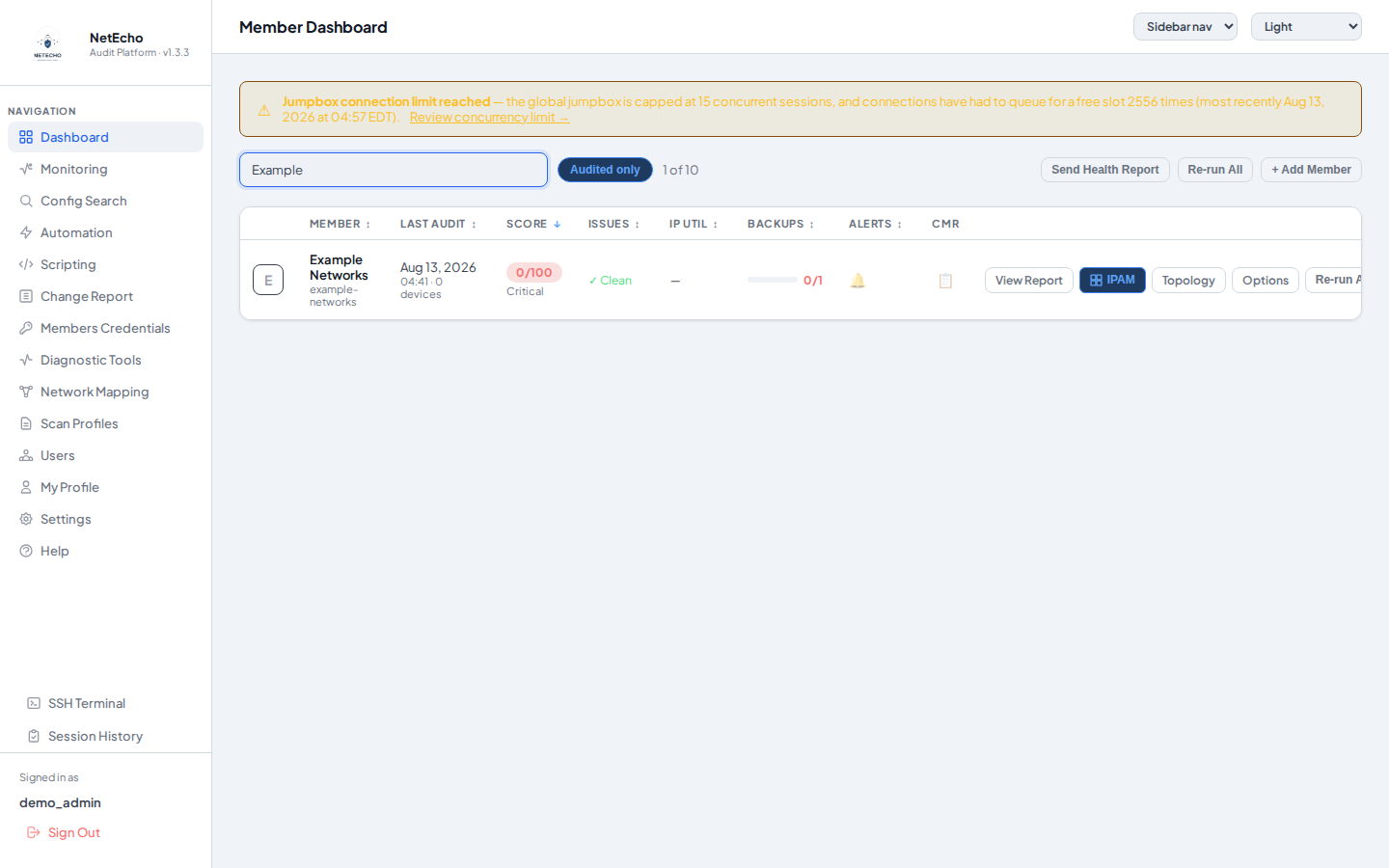
Member Dashboard listing several demo customer networks with their scores, issues, and alerts
Demo data — the fleet-wide Dashboard: every customer, one scored, searchable list.
pricing

Simple, per-member pricing

One price per customer network ("member") you manage — the full platform, every discipline above, no separate modules to license. Choose who hosts it.

Self-Hosted

Run it on your own infrastructure

$800 / member / yr
Up to 30 devices per member
  • The full platform — auditing, NCCM, monitoring, and automation, every discipline on this page
  • Deployed inside your own infrastructure — your data never leaves your network
  • You manage hosting — updates, backups, and uptime are on your own infrastructure
  • Unlimited admin & tenant logins per member
  • Email support
Request a Demo & Quote
Privately Hosted

We host and manage it for you

$2,000 / member / yr
Up to 30 devices per member
  • The full platform — auditing, NCCM, monitoring, and automation, every discipline on this page
  • Deployed on dedicated infrastructure we manage for you — no server to stand up or maintain
  • We handle hosting — updates, backups, and uptime are on us
  • Unlimited admin & tenant logins per member
  • Priority support
Request a Demo & Quote

Devices beyond the first 30 on a member are quoted individually — reach out for a demo and a custom quote sized to that member's actual device count.

summary

Stop finding out
after it's already a problem.

Continuous security auditing and network management, on the same inventory, the same access model, and the same login — for every customer network under management, hosted on your own infrastructure and ready to run as part of your own managed-services offering, starting today instead of at the next scheduled review.

Audit — score, alert, report, continuously
Manage — inventory, change, automate, monitor
Scale — every customer, their own window, one platform you own and can resell

A 400-device fleet audited by hand runs roughly $68,000 a year just to stay current, in engineer hours alone. See what running it on your own fleet actually looks like.

get in touch

Request a demo & quote

Tell us a little about your fleet and we'll walk you through WatchTower running against a real network, and put together pricing sized to your book — no canned slides, no fluff.

HoursSales — 9:00am–6:00pm · Engineering — 24/7 on-call support
AddressPO Box 37898 · 2100 Lake Dam Rd, Raleigh, NC 27606
Existing client?Client Ticket Portal →